
 Music Motion v.2
El motor de sonido de la suite. The suite's sound engine.
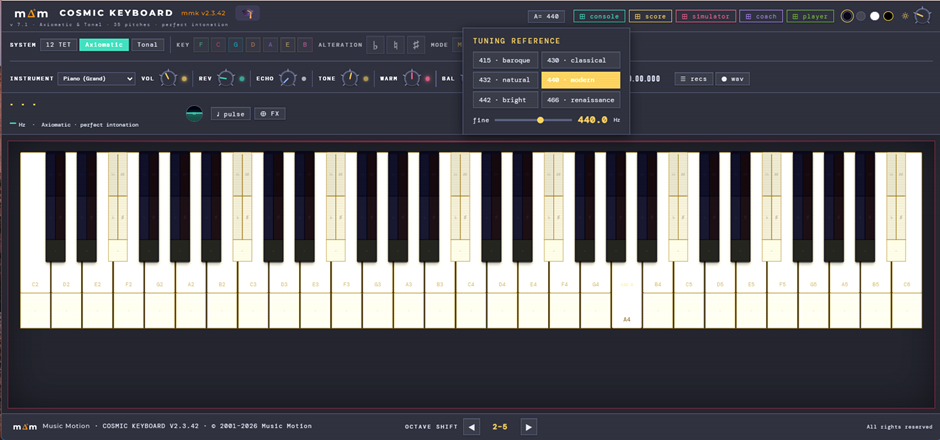
El corazón de Music Motion y su único sintetizador: la única aplicación que produce sonido para toda la suite. Cada tecla está dividida — arriba la altura pitagórica pura, abajo una franja temperada (12-TET) para comparar. The heart of Music Motion and its only synthesizer: the only app that makes sound for the whole suite. Each key is split — pure Pythagorean pitch on top, an equal-tempered (12-TET) strip below to compare.
Tócalo ya: el teclado de tu computadora es el instrumento. Ver los atajos →Play it right away: your computer keyboard is the instrument. See the shortcuts →
Sistema AxiomáticoAxiomatic System
Sistema derivado de axiomas o reglas matemáticas indiscutibles. Ejemplos: el sistema pitagórico (razón 3:2, quinta justa pura) y los sistemas temperados (raíz x de 2). Ambos son axiomáticos: cada tono se sigue inevitablemente de la regla fundadora. Este teclado revela la coma pitagórica — la diferencia audible entre Do♯ (278.437 Hz) y Re♭ (274.690 Hz) que el temperamento igual borra.A system derived from indisputable mathematical axioms or rules. Examples: the Pythagorean system, generated entirely by the ratio 3:2 (pure perfect fifth), and the equal-temperament systems, built from the x-th root of 2. Both are axiomatic: every pitch follows inevitably from the founding rule. This keyboard reveals the Pythagorean comma — the audible gap between C♯ (278.437 Hz) and D♭ (274.690 Hz) that equal temperament erases.
Sistema TonalTonal System
Sistema mixto y posicional basado en una fundamental elegida (la tonalidad). Sus siete sonidos fundamentales son axiomáticos; las alteraciones (♭ más bajos, ♯ más altos) desplazan cada grado hacia el próximo sin sobrepasarlo. Un becuadro (♮) puede funcionar como alteración —ascendente o descendente— según el contexto. Ejemplo: Re♮ en Sol♭ mayor es semitono cromático respecto a Re♭ y diatónico respecto a Mi♭. 7 tonalidades × 3 alteraciones = 21 contextos tonales.A mixed, positional system rooted in a chosen fundamental (the key). Its seven core pitches are axiomatic; alterations (♭ lower, ♯ higher) shift each degree toward the next without crossing it. A natural (♮) can itself act as an alteration — descending or ascending — depending on context. For example, D♮ in G♭ major is a chromatic semitone above D♭ and a diatonic semitone below E♭. Seven keys × three alterations = 21 tonal contexts.
El TecladoThe Keyboard
Cada tecla blanca se divide: 4/5 superiores = tono perfecto · 1/5 inferior = referencia temperada. La A4 no se divide — la referencia universal, idéntica en todos los sistemas. Entre cada par de teclas blancas —incluidas Mi→Fa y Si→Do— hay una tecla de 3 zonas: inferior = temperado (cyan) · medio = ♭ | ♯ · superior = ♭♭ | ♯♯. Mi→Fa y Si→Do son marfil con franja turquesa de ¼ de tono.Each white key is divided: upper 4/5 = perfect pitch · lower 1/5 = equal-tempered reference. A4 is undivided — the universal reference, identical in all systems. Between every pair of white keys — including E→F and B→C — sits a key with 3 zones: bottom = tempered (cyan) · middle = ♭ | ♯ · top = ♭♭ | ♯♯. E→F and B→C keys are ivory-coloured with a turquoise tempered strip (¼-tone).
Acord Lab — acordes con el mouseChord Lab — chords with the mouse
Clic izquierdo toca una nota. Clic derecho sobre el teclado activa el Sostén: la nota tomada queda sonando con su luz encendida y las siguientes se van apilando, así escuchas el acorde completo. Otro clic derecho apaga todo. Pensado para oír acordes complejos sin tener que mantener varias teclas apretadas.Left-click plays a note. A right-click on the keyboard turns on Hold: the held note keeps ringing with its light on, and each new note stacks on top, so you hear the whole chord. Another right-click turns everything off. Made for hearing complex chords without holding several keys down at once.
Posición TonalTonal Position
El horizonte artificial muestra la función de cada nota dentro del contexto tonal activo. Línea central = axiomático · horizonte que sube = tonalmente más alto (rosa) · horizonte que baja = tonalmente más bajo (azul) · oro = cuarto de tono.The artificial horizon shows the function of each note within the active tonal context. Center line = axiomatic · horizon rising = tonally higher (rose) · horizon falling = tonally lower (blue) · gold = quarter-tone.
GrabadorRecorder
Captura frecuencias exactas en Hz y duraciones en tiempo real. Sin MIDI, sin cuantización, sin rejilla de 12 tonos. Cada grabación es una secuencia pura de frecuencias pitagóricas en el tiempo. La lista admite también archivos MIDI, que suenan como capa temperada sobre las franjas cian, y un control de tempo de reproducción (×0.5–×2): se puede grabar lento y escuchar a velocidad. El transporte tiene pausa y salto de diez segundos hacia atrás o adelante, con un reloj al milisegundo (00.00.000); saltando a otra danza el teclado entra en la tonalidad de ese tramo. Y lo recién grabado aparece arriba del cofre, con «keep in list» y «save as .mmf» a mano. Grabar con el Score sonando está previsto: la toma sale limpia, solo lo que tocaste.Captures exact Hz frequencies and real-time durations. No MIDI, no quantization, no 12-tone grid. Every recording is a pure sequence of Pythagorean frequencies in time. The list also takes MIDI files — played as a tempered layer on the cyan strips — plus a playback-tempo control (×0.5–×2): record slowly, listen at speed. The transport has pause and a ten-second jump back or forward, with a clock down to the millisecond (00.00.000); jump to another dance and the keyboard enters that section's key. What you have just recorded shows at the top of the chest, with "keep in list" and "save as .mmf" at hand. Recording while the Score plays is by design: the take comes out clean, only what you played.
⬤ wav — llevarte lo que estás oyendo⬤ wav — take away what you are hearing
Un botón nuevo en la barra del grabador. Un clic empieza la captura —el botón se pone rojo y cuenta los segundos— y otro clic la cierra y te baja el archivo, en 24 bits y estéreo. No es un render offline: graba en vivo lo que de verdad sale por el master, con su hilo de audio y su limitador, que es justamente lo que sirve para cazar un clic o un roce que una mezcla ideal no tendría. El punto de escucha cuelga después del tono, la calidez, la reverb, el balance y el MASTER de la Console: si el MASTER está al 20 %, el archivo sale al 20 %. Es a propósito — se captura lo que suena, no una mezcla ideal; por eso lo que muevas en la Console mientras graba queda en el archivo. El audio tiene que haber arrancado: toca una nota antes. La misma captura se pide desde el Score con File → SAVE AS WAV, que toca la obra o la región SELECT y baja el archivo con el nombre de la obra.A new button in the recorder bar. One click starts the capture —the button turns red and counts the seconds— and another click closes it and downloads the file, in 24-bit stereo. It is not an offline render: it records live what actually comes out of the master, with its audio thread and its limiter, which is exactly what you need to catch a click or a scrape an ideal mix would never have. The listening point hangs after tone, warmth, reverb, balance and the Console's MASTER: if the MASTER sits at 20 %, the file comes out at 20 %. That is on purpose — what is captured is what sounds, not an ideal mix; which is why anything you move in the Console while it records ends up in the file. Audio must already be running: play a note first. The same capture can be requested from the Score with File → SAVE AS WAV, which plays the piece or the SELECT region and downloads the file named after the piece.
El VOL es el de tus teclasVOL is your keys' volume
Hasta ahora el VOL del Keyboard, el Vol del Score y el MASTER de la Console eran tres manijas de la misma perilla. Ahora cada una manda sobre lo suyo: el VOL de acá sobre lo que tocas en el teclado, el Vol del Score sobre lo que el Score manda tocar, y el MASTER de la Console sobre el total —lo que graban el ⬤ wav y el SAVE AS WAV—. Con el Score en play, bajas el VOL y sólo baja lo tuyo; bajas el Vol del Score y sólo baja el Score. Por dentro, cada canal tiene dos entradas al mismo pan, una por motor, y las perillas en su 40 % de siempre suenan exactamente igual que antes.Until now the Keyboard's VOL, the Score's Vol and the Console's MASTER were three handles on the same knob. Now each rules its own: the VOL here what you play on the keys, the Score Vol what the Score sends to be played, and the Console's MASTER the whole —what the ⬤ wav and SAVE AS WAV record—. With the Score playing, lower VOL and only your playing goes down; lower the Score Vol and only the Score does. Inside, each channel has two inputs to the same pan, one per engine, and the knobs at their usual 40 % sound exactly as before.
A= · el diapasón de toda la suiteA= · the reference pitch of the whole suite
Botón A= 440, arriba a la derecha. Abre Tuning Reference: seis diapasones a un clic —415 barroco, 430 clásico, 432 natural, 440 moderno, 442 brillante, 466 renacentista— y el deslizador fine, de 380 a 480 Hz en medios hercios. Al cambiar el La se mueve con él toda la cadena de quintas: las 35 alturas suben o bajan juntas y los intervalos siguen siendo pitagóricos puros. No transpone la música: la afina más grave o más aguda, entera.The A= 440 button, top right. It opens Tuning Reference: six reference pitches one click away —415 baroque, 430 classical, 432 natural, 440 modern, 442 bright, 466 renaissance— and the fine slider, from 380 to 480 Hz in half-hertz steps. When the A moves, the whole chain of fifths moves with it: the 35 pitches rise or fall together and the intervals stay purely Pythagorean. It does not transpose the music: it tunes the whole of it lower or higher.
Con el Score en play. El A= del Keyboard y el del Score son el mismo: lo que cambias en uno lo toma el otro. Así puedes poner una partitura a sonar desde el Score y buscar en el Keyboard tu referencia mientras escuchas: la de tu instrumento, la de tu orquesta o la de un repertorio histórico. La nota que está sonando termina como empezó; la siguiente ya entra con el La nuevo. Si después guardas desde el Score, el .mmf recuerda el diapasón y la obra vuelve a abrir con él. El Pythagorean Tuner tiene el mismo control (Reference pitch A4), pero es una aplicación aparte: si afinas tu instrumento a 442 con él, pon también 442 aquí. Más en las preguntas frecuentes.With the Score playing. The Keyboard’s A= and the Score’s are one and the same: whatever you change in one, the other takes. So you can set a score playing from the Score and look for your reference on the Keyboard while you listen: your instrument’s, your orchestra’s, or that of a historical repertoire. The note already sounding ends as it began; the next one comes in at the new A. If you then save from the Score, the .mmf remembers the reference pitch and the piece reopens with it. The Pythagorean Tuner has the same control (Reference pitch A4), but it is a separate application: if you tune your instrument to 442 with it, set 442 here as well. More in the FAQ.
Vibrato vivoA living vibrato
En las cuerdas frotadas y en todo lo que se sostiene, el vibrato ya no nace pleno junto con la nota: entra después del ataque, como el arco que primero agarra la cuerda y recién entonces empieza a moverse. En una nota corta no entra —no hay tiempo de vibrar—, y de cierto largo en adelante vibra entero. Su velocidad acompaña al gesto, en un recorrido corto a propósito (±12% del rate del preset): el ejecutante mueve mucho más la anchura que la velocidad, e igualarlas suena nervioso en vez de intenso. Y sigue la jerarquía del grupo barrado: la primera nota vibra más que las que la siguen, la misma jerarquía que ya tenía la presión.On bowed strings and on everything that sustains, the vibrato no longer starts at full width along with the note: it enters after the attack, like a bow that first grips the string and only then begins to move. On a short note it does not enter —there is no time to vibrate— and from a certain length on it vibrates fully. Its speed follows the gesture, over a deliberately short range (±12% of the preset's rate): a player moves the width far more than the speed, and matching them sounds nervous rather than intense. And it follows the hierarchy of the beamed group: the first note vibrates more than the ones after it, the same hierarchy pressure already had.
♩ Pulse — metrónomo♩ Pulse — metronome
Un metrónomo de bolsillo dentro del Keyboard: luz que late, tempo por perilla (30–240), por términos clásicos (Largo a Presto) o marcándolo con el tap, y un click sonoro opcional con volumen y tono regulables. Y late con la obra: si tocas un mmf en el cofre o si el Score está sonando —también dentro de un loop A–B—, la luz sigue el compás y el cartel muestra el tempo del tramo, danza por danza. La obra manda: al entrar su pulso, el metrónomo libre se detiene. Pensado tanto para el músico que estudia como para quien recién empieza.A pocket metronome inside the Keyboard: a beating light, tempo by knob (30–240), by the classical terms (Largo to Presto) or by tapping it in, plus an optional audible click with adjustable volume and tone. And it beats with the music: play an mmf from the chest, or let the Score play — inside an A–B loop too — and the light follows the bar while the readout shows the tempo of that section, dance by dance. The work leads: as its pulse comes in, the free metronome stops. Made for the practising musician and the beginner alike.
Teclado QWERTYQWERTY keys
Tocar desde el ordenador: filas z / a / q = octavas · Mayús = bemoles · fila numérica = sostenidos. Cuenta la posición de la tecla, no la letra: con un teclado AZERTY o QWERTZ, toca la tecla que está en el lugar de la del QWERTY.Play from the computer: z / a / q rows = octaves · Shift = flats · number row = sharps. What counts is the key's position, not its letter: on an AZERTY or QWERTZ keyboard, press the key in the QWERTY key's place.
TODAL — tocar por gradosTODAL — playing by degrees
En modo Tonal las teclas del ordenador dejan de ser notas y pasan a ser grados de la tonalidad activa: filas z / a / q = grados I–VII en tres octavas (y k l ñ · i o p siguen hasta el X), con el número romano del grado escrito sobre la tecla. El mismo dedo suena la nota correcta en cualquier tonalidad —en Fa mayor el grado IV suena Si♭— y el modo menor cambia la escala solo. Es el mismo teclado por grados del Minikeyboard del Score. Las notas cromáticas de la tonalidad quedan al mouse, y ↑/↓ aplican el apotome sobre la nota que se está sosteniendo.In Tonal mode the computer keys stop being notes and become degrees of the active key: rows z / a / q = degrees I–VII across three octaves (and k l ñ · i o p carry on to the tenth), with the degree’s roman numeral written on the key. The same finger sounds the right note in any key —in F major degree IV sounds B♭— and minor mode changes the scale by itself. It is the same degree keyboard as the Score’s Minikeyboard. The key’s chromatic notes stay with the mouse, and ↑/↓ apply the apotome to the note being held.
La paleta de instrumentos: todos a la vistaThe instrument palette: all of them at a glance
El <select> nativo no acepta columnas —el desplegable lo dibuja el sistema operativo—, así que el clic sobre el campo de instrumento abre una paleta en columnas: todas las familias a la vista de un vistazo, cada una en su columna, con un filtro por nombre arriba. Los instrumentos que el banco tiene pero el mapa activo no, salen apagados en vez de desaparecer: se ve que existen y que hoy no están cargados. El pin la deja abierta para probar varios seguidos y comparar de oído; desfijada, elegir uno la cierra. La elección vuelve por el mismo camino de siempre, así que no cambia nada del mix. Es la misma paleta en las cuatro apps —Score, Keyboard, Console y Register—, servida por mm-presets.js.The native <select> cannot do columns —the OS draws that dropdown— so clicking the instrument field opens a column palette instead: every family visible at a glance, each in its own column, with a name filter on top. Instruments the bank has but the active map does not are shown dimmed rather than hidden: you can see they exist and that they are not loaded today. The pin keeps it open so you can try several in a row and compare by ear; unpinned, picking one closes it. The choice returns through the usual path, so nothing about the mix changes. It is the same palette in all four apps —Score, Keyboard, Console and Register— served by mm-presets.js.
Contar sólo lo que suenaCounting only what sounds
El motor construye cada voz antes de su horario —así el ritmo no depende de lo que tarde el dibujo— y eso tiene una consecuencia que costó encontrar: los topes que acotan la polifonía contenían, en todo momento, notas del futuro. Contarlas les robaba lugar a las que estaban sonando, y elegir víctima por orden de llegada podía apagar una nota que todavía no había empezado. Ahora los topes cuentan y eligen sólo entre las voces que ya arrancaron.The engine builds each voice before its time — so the rhythm does not depend on how long the drawing takes — and that has a consequence that took a while to find: the caps that bound polyphony contained, at any moment, notes from the future. Counting them stole room from the ones actually sounding, and picking a victim by arrival order could silence a note that had not started yet. The caps now count and choose only among voices that have already started.
Y una voz que ya terminó su cola tampoco ocupa lugar. Las notas de piano, arpa o percusión decaen solas y nadie las corta, pero quedaban anotadas para siempre en el registro de voces: el contador sólo subía, y al llegar al tope cada nota nueva cortaba en duro una cuerda que todavía sonaba. Eso es un clic, uno por nota, y explicaba un síntoma raro — parar y volver a arrancar justo antes del pasaje lo arreglaba, porque al parar el registro vuelve a cero. Ahora la voz sale del registro cuando su cola termina.And a voice whose tail has ended does not take a slot either. Piano, harp or percussion notes decay on their own and nobody cuts them, but they stayed listed in the voice registry forever: the counter only climbed, and once at the cap every new note hard-cut a string that was still ringing. That is a click, one per note, and it explained an odd symptom — stopping and restarting just before the passage fixed it, because stopping resets the registry. Now a voice leaves the registry when its tail ends.
Presencia: el peso de cada dedoPresence: the weight of each finger
Dentro de un acorde no todas las notas pesan igual: un dedo se asienta y los otros quedan aéreos. La presencia es ese reparto, nota por nota — y vive más en el ataque que en el volumen, como el arco que baja con peso frente al que se levanta liviano. El motor la trata como física: el recorrido de la tecla, el apagador que cae desde más abajo en un ligado, el ruido de la mecánica que se agrupa hacia el beat en vez de oírse nota por nota.Inside a chord not every note weighs the same: one finger settles and the others stay airy. Presence is that distribution, note by note — and it lives more in the attack than in the volume, like a down-bow landing with weight against an up-bow lifting light. The engine treats it as physics: the key’s travel, the damper falling from lower down inside a slur, the mechanism noise grouping toward the beat instead of being heard note by note.
Sound FX por canal: reverb, eco, porta, rotary y vibrato en vivoSound FX by channel: reverb, echo, porta, rotary and vibrato, live
El botón ⊕ FX de la barra abre un popup por canal con seis perillas —Reverb · Eco wet · Eco realim · Eco temp · Porta · Rotary—, con el nombre del instrumento y en el idioma del Coach. Afectan solo lo que tocas en vivo (Motor A); el mismo popup en el Score afecta solo el playback (Motor B), y los dos no se mezclan porque los envíos van por voz. El Vibrato no está acá: es la sexta perilla del popup del Score, porque se escribe como región (y allí abre la profundidad de la afinación, no la velocidad). El Porta desliza desde la última nota del canal. El Rotary es el altavoz giratorio del órgano de jazz (Leslie): en 0 está apagado; al girarlo se enciende y va de Slow (0,8 Hz) a Fast (6,7 Hz), y acelera y frena como el real. Doble clic: Off. El popup abre fijado, debajo del botón, y se cierra con un clic en el candado.The toolbar's ⊕ FX button opens a per-channel popup with six knobs —Reverb · Echo wet · Echo fb · Echo time · Porta · Rotary—, showing the instrument's name and in the Coach's language. They affect only what you play live (Engine A); the same popup in the Score affects only playback (Engine B), and the two do not mix because the sends are per-voice. Vibrato is not here: it is the sixth knob of the Score's popup, because it is written as a region (and there it widens the pitch's depth, not its speed). Porta slides in from the channel's last note. Rotary is the jazz organ’s rotating speaker (Leslie): at 0 it is off; turning it switches it on, from Slow (0.8 Hz) to Fast (6.7 Hz), and it speeds up and slows down like the real one. Double-click: Off. The popup opens pinned, just below the button, and closes with a click on the lock.
La entrada: un crédito por díaThe door: one credit per day
Abierto desde el sitio, el teclado pide tu correo una sola vez y entra. Los primeros 3 créditos son de regalo, y un crédito es un día — no una nota, ni una sesión: abres, tocas lo que quieras, cierras y vuelves, y hasta el día siguiente no se descuenta nada más. No hay cuenta, ni contraseña, ni correos nuestros: el correo es tu nombre en el contador, y el teclado se acuerda de tu máquina para no volver a preguntarte. Cuando se acaban, aparece la pantalla del café: si esto te sirve, invitas uno y seguimos. Y si el servidor no contesta, el teclado abre igual: un corte de red no puede dejarte a pie en medio de algo.Opened from the site, the keyboard asks for your email once and lets you in. The first 3 credits are on the house, and one credit is one day — not a note, not a session: you open it, you play as long as you like, you close it and come back, and nothing more is charged until the next day. No account, no password, no mail from us: the address is just your name on the counter, and the keyboard remembers your machine so it never asks again. When they run out, the coffee screen appears: if this is useful to you, buy one and we carry on. And if the server does not answer, the keyboard opens anyway: a dropped connection cannot leave you stranded in the middle of something.
La lista de instrumentos habla tu idiomaThe instrument list speaks your language
El selector de instrumentos salía mezclado —unos nombres en inglés, otros en castellano, y los títulos de familia siempre en inglés—. Ahora la lista entera habla el idioma que elegiste, títulos de familia incluidos, tanto en el desplegable como en la paleta en columnas. El idioma es el mismo de toda la suite: se elige una vez, con el botón derecho sobre COACH o en Preferences del Score. Lo que ves cambia; lo que suena, no: el nombre interno de cada instrumento no se traduce. En la misma pasada, los dos globitos de las perillas del Pulse —el volumen y el tono del clic— dejaron de salir en castellano con el inglés elegido. Contado largo en la Guía de uso.The instrument selector used to come out mixed —some names in English, others in Spanish, and the family titles always in English—. Now the whole list speaks the language you chose, family titles included, both in the dropdown and in the column palette. The language is the one used across the suite: you choose it once, by right-clicking COACH or in the Score's Preferences. What you see changes; what you hear does not: each instrument's internal name is never translated. In the same pass, the two Pulse knob tooltips —click volume and click tone— stopped coming out in Spanish with English chosen. Told at length in the User Guide.