
 Music Motion v.2
La partitura. The score.
Escribes música por canales. Su mini-keyboard en modo TODAL permite tocar por grados de la tonalidad (en Fa mayor, el grado IV suena Si♭, de forma automática). No produce sonido: lo genera el Keyboard, sincronizado en vivo. You write music by channels. Its mini-keyboard in TODAL mode lets you play by scale degrees (in F major, degree IV sounds B♭, automatically). It makes no sound of its own — the Keyboard generates it, synced live.
Escritura por canalesWriting by channels
Compones por canales —hasta 32—, cada uno con su instrumento. CH10 está fijo a percusión. Por canal puedes silenciar (mute) y hacer visible o invisible su línea, para concentrarte en una voz a la vez.You compose by channels —up to 32—, each with its own instrument. CH10 is fixed to percussion. Per channel you can mute and show or hide its line, to focus on one voice at a time.
El Mini-keyboard (modo TODAL)The Mini-keyboard (TODAL mode)
La tira de abajo, con tres zonas: a la izquierda cómo tocas, al centro las teclas, a la derecha el canal en el que estás escribiendo. WRITE escribe en el cursor y LISTEN sólo suena, sin tocar la partitura. El botón WRITE cicla ✏ WRITE → TODAL PLAY → TODAL WRITE: en TODAL las teclas quedan rotuladas por grado de la tonalidad activa, y el mismo grado da siempre la nota correcta — por eso una persona sin experiencia musical puede escribir bien en cualquier tonalidad, y un músico puede componer sin saber tocar piano. Debajo, la afinación: System (Axiom pitagórico puro · Tonal con posiciones), Mode (mayor, o menor natural, armónica y melódica) y Sens, cuánto se sube el grado sensible. Y en la zona derecha, la ficha del canal activo con su volumen y la grilla de los 32, para cambiar de canal con un clic.The bottom strip, in three zones: on the left how you play, in the centre the keys, on the right the channel you are writing into. WRITE writes at the cursor and LISTEN only sounds, without touching the score. The WRITE button cycles ✏ WRITE → TODAL PLAY → TODAL WRITE: in TODAL the keys are labelled by degree of the active key, and the same degree always gives the right note — which is why someone with no musical training can write correctly in any key, and a musician can compose without being able to play the piano. Below, the tuning: System (pure Pythagorean Axiom · Tonal with positions), Mode (major, or natural, harmonic and melodic minor) and Sens, how far the leading degree is raised. And in the right zone, the active-channel card with its volume and the grid of 32, to change channel with one click.
El Panel: dos sistemas a la vistaThe Panel: two systems in sight
El botón ▭ PANEL abre una segunda vista debajo de la partitura, para mirar dos cosas a la vez: el solista y el bajo, la voz que copias y la que escribes. Los chips CH del encabezado eligen qué canales espeja —cada uno en su color—, y si escribes en un canal que no estaba, el Panel lo agrega solo. Tiene zoom propio (Ctrl + rueda) y se agranda arrastrando su barra. 🎧 SOLO le pide a la Console que aísle esos canales y devuelve la mesa como estaba al apagarlo; 🖨 PRINT VIEW los abre en la vista de impresión. Y no es sólo para mirar: el clic derecho funciona adentro, con los mismos editores de la hoja grande. El Panel y el teclado se turnan: abrir uno esconde el otro.The ▭ PANEL button opens a second view under the score, to watch two things at once: the soloist and the bass, the voice you are copying and the one you are writing. The header’s CH chips choose which channels it mirrors —each in its own colour—, and if you write in a channel that was not there, the Panel adds it by itself. It has its own zoom (Ctrl + wheel) and grows by dragging its bar. 🎧 SOLO asks the Console to isolate those channels and gives the desk back as it was when you switch it off; 🖨 PRINT VIEW opens them in the print view. And it is not just for looking: right-click works inside it, with the same editors as the big sheet. The Panel and the keyboard take turns: opening one hides the other.
Armadura automáticaAutomatic key signature
Eliges la tónica y la armadura se ajusta sola. La resolución es diatónica por armadura, con las etiquetas de grado en oro: ves la función de cada nota, no solo su nombre.Pick the tonic and the key signature sets itself. Resolution is diatonic by key signature, with degree labels in gold: you see each note's function, not just its name.
Duraciones y silenciosDurations & rests
Defines la duración de cada nota (de redonda a semifusa). Un segundo clic sobre la misma figura la convierte en silencio, así escribes ritmo y pausas con el mismo gesto. Y con el teclado numérico las eliges a una mano —del 1 (la más corta) al 7 (la redonda), el puntillo en la tecla del punto— siguiendo la convención de los editores de partitura.You set each note's duration (from whole to 64th). A second click on the same value turns it into a rest, so you write rhythm and pauses with the same gesture. And with the numeric keypad you pick them one-handed —from 1 (the shortest) to 7 (the whole note), the dot on the period key— following the score-editor convention.
La banda flotanteThe floating band
Las figuras viajan contigo: una banda flotante con las duraciones, el puntillo, las grace notes y los tuplets, que arrastras a donde escribes. Se estira en una línea o se pliega en un bloque, y recuerda dónde la dejaste. Con ella puedes componer con el mini-keyboard cerrado, a partitura completa. Y es también una mesa de edición: sobre la nota seleccionada aplicas articulaciones (staccato, acento, tenuto, marcato, fermata…) y dinámicas, sin abrir otros paneles.The note values travel with you: a floating band with durations, dot, grace notes and tuplets that you drag wherever you're writing. Stretch it into a line or fold it into a block — it remembers where you left it. With it you can compose with the mini-keyboard closed, full-page score. It's also an editing desk: on the selected note you apply articulations (staccato, accent, tenuto, marcato, fermata…) and dynamics, without opening other panels.
Notas que se arrastranDrag notes onto the staff
Toma una figura de la banda y suéltala en el pentagrama: una nota fantasma te muestra exactamente dónde va a caer — línea o espacio según la clave del canal, y el beat correcto del compás — mientras la escuchas sonar suavemente en cada altura. Si entras adelantado, el Score completa el hueco con los silencios justos, y el Coach (si está despierto) te cuenta por qué. Y lo escrito también se mueve: un clic toma la nota, viaja con el ratón sonando, y un segundo clic la deja en su nuevo lugar.Grab a value from the band and drop it on the staff: a ghost note shows exactly where it will land — line or space per the channel's clef, and the right beat of the measure — while you hear it softly at each height. If you come in late in the bar, the Score fills the gap with the proper rests, and the Coach (if awake) tells you why. What's written can move too: one click picks the note up, it travels with the mouse sounding as it goes, and a second click sets it down.
AgógicaAgogics
Acentos de expresión por nota: +1 sutil y +2 expresivo, con curva π directa o INV inversa. Pequeños desvíos de tiempo que dan vida a la línea sin salir de la rejilla.Per-note expression accents: +1 subtle and +2 expressive, with a direct (π) or inverse (INV) curve. Small timing nuances that bring the line to life without leaving the grid.
La agógica de frase: el solista juega, la reja no se muevePhrase agogics: the soloist plays, the grid stays put
La agógica de arriba inclina una nota; ésta le da forma a un tramo entero de un canal. En modo SELECT cierras una selección sobre un canal, botón derecho, ⌘ ASYM AGOG: la región queda dibujada sobre ese tramo. Adentro, el solista juega con la frase mientras el acompañamiento sigue en su reja: el tempo no se toca. Es el rubato de siempre, el arpa que va inexorable y el bajo que juega. La región sólo desplaza — el tramo dura lo escrito y la frase reengancha sola, así que se puede usar con la orquesta tocando.
El EJE dice qué gradúa la curva, y son tres cosas distintas de una misma nota: Tempo, cuándo entra; Pres, con qué entra —la presencia del ataque, arco arriba o abajo, soplado o articulado—; y ART, cuánto dura y con cuánto peso, escalando lo que la articulación escrita ya dice. Cada eje guarda su curva sobre el mismo tramo, y el color de la banda dice cuál estás mirando: lima, teal, lavanda.
Las fases son la forma de la curva: Inhale toma aire al entrar y vuelve, Move empuja en el cuerpo y paga al final, Arrive roba del medio y ensancha la llegada, Exhale afloja después del pico. Flat no es una curva: es la reja — la línea queda en cero y suena sólo lo que muevas a mano, que es como se escribe un vals. π⁻¹ invierte. Con cualquiera de las cuatro primeras la frase entra y sale en la reja: empieza y termina en cero. INT dice cuánto, en la unidad del eje, y el número al pie del dibujo lo dice en claro: milisegundos, escalones de presencia o por ciento.
El dibujo no es un adorno: cada punto es una nota del tramo. Arrástralo y retocas ésa sola, con la fase intacta — la línea sigue siendo la forma y el punto separado de ella es tu corrección. Las flechitas caminan de nota en nota y los +/− afinan. En el eje ART los puntos huecos son las notas sin articulación escrita: ahí no hay nada que escalar.
Los chips de canal dicen a quiénes alcanza: una frase que hacen los dos violines es una región que alcanza a los dos, no dos regiones. Y si le pones nombre, la región pasa a ser un patrón: puedes llevarlo a otro tramo —Take · de M a M, que lo repite cada tantos compases como mida— y esconder o borrar de una vez todas las que lo llevan. El patrón se ancla por métrica: «la segunda del compás» es un pulso desde el arranque, no la segunda nota que aparezca. El ? del popup lo cuenta entero, en el idioma que tengas puesto.The agogics above leans one note; this one shapes a whole span of one channel. In SELECT mode you close a selection over a channel, right-click, ⌘ ASYM AGOG: the region is drawn over that span. Inside it the soloist plays with the phrase while the accompaniment stays on its grid: the tempo is never touched. It is rubato in the old sense, the harp going on inexorably and the bass playing along. The region only displaces — the span lasts what is written and the phrase rejoins on its own, so it works with the orchestra playing.
The AXIS says what the curve grades, and they are three different things about one note: Tempo, when it comes in; Pres, what it comes in with —the presence of the attack, up-bow or down-bow, breathed or tongued—; and ART, how long it lasts and with how much weight, scaling what the written articulation already says. Each axis keeps its own curve over the same span, and the band colour says which one you are looking at: lime, teal, lavender.
The phases are the shape of the curve: Inhale takes air on the way in and returns, Move pushes through the body and repays at the end, Arrive steals from the middle and broadens the goal, Exhale relaxes after the peak. Flat is not a curve: it is the grid — the line sits at zero and only what you move by hand is heard, which is how a waltz is written. π⁻¹ mirrors it. With any of the first four the phrase leaves and rejoins the grid: it starts and ends at zero. INT says how much, in the unit of the axis, and the figure under the drawing says it plainly: milliseconds, steps of presence, or per cent.
The drawing is not decoration: every dot is a note of the span. Drag one and you tweak that note alone, with the phase left intact — the line is still the shape, and a dot away from it is your correction. The arrows walk from note to note and the +/− fine-tune. On the ART axis the hollow dots are notes with no written articulation: there is nothing to scale there.
The channel chips say who it reaches: a phrase both violins play is one region reaching both, not two regions. And once you give it a name, the region becomes a pattern: you can take it to another span —Take · from M to M, repeating it every as many bars as it is long— and hide or delete every region carrying that name at once. The pattern anchors by metre: "the second of the bar" is one beat from the start, not the second note that shows up. The popup's ? tells the whole story, in whichever language you have set.
El calderón sostiene la notaThe fermata holds the note
El calderón paraba el reloj, pero la nota terminaba igual en su valor escrito y la espera sonaba como silencio. Ahora esa espera se le suma a todo lo que siga sonando en ese punto: la nota que lo lleva y lo que esté tenido debajo en otros canales, como pasa en la orquesta cuando el director sostiene el acorde. La coma y la doble barra no cambian — ésas sí son silencio, y la nota anterior no se estira.The fermata stopped the clock, but the note still ended on its written value and the wait sounded like silence. Now that wait is added to everything still sounding at that point: the note carrying it and whatever is held underneath in other channels, as happens in an orchestra when the conductor sustains the chord. The comma and the double bar are unchanged — those really are silence, and the previous note is not stretched.
Una dinámica va con su notaA dynamic goes with its note
Un matiz escrito un pelo antes o después de su nota no era sólo un problema de dibujo: la nota no lo alcanzaba y sonaba sin él. Un ppp puesto un octavo de tiempo tarde dejaba el compás entero sonando crudo, y el matiz entraba recién en el siguiente. Ahora la dinámica se pega a la nota al escribirla, y se queda pegada al moverla. Y no hace falta rehacer lo viejo: al abrir un archivo, el Score busca para cada marca la nota que le corresponde, la acomoda ahí y te lo cuenta — el mismo cuidado que ya tenía con las ligaduras.A dynamic written a hair before or after its note was not just a drawing problem: the note never reached it and sounded without it. A ppp placed an eighth of a beat late left the whole bar sounding raw, and the marking only came in on the next one. Now the dynamic snaps to the note when you write it, and stays with it when you move it. And there is nothing to redo in old work: on opening a file, the Score finds the note each mark belongs to, settles it there and tells you — the same care it already took with slurs.
La obra respira antes de empezarThe work breathes before it starts
La música arrancaba en el mismo instante del clic: dabas play y la primera nota llegaba de golpe, sin aviso. Ahora, cuando arrancas desde el principio, hay un breve instante de silencio antes del primer sonido — el aire que toma un director antes de dar la entrada. El archivo no cambia nada: el respiro se le da al reloj, no a la música, así que ninguna nota se corre y el compaseo queda intacto. Desde el medio el play sigue siendo inmediato: eso es un salto, no una entrada.The music used to start at the very instant of the click: you hit play and the first note arrived out of nowhere. Now, when you start from the beginning, there is a brief instant of silence before the first sound — the air a conductor takes before giving the upbeat. Nothing changes in the file: the breath is given to the clock, not to the music, so no note moves and the barring stays intact. From the middle, play is still immediate: that is a jump, not an entrance.
Guardar directoDirect save
El botón 💾 SAVE de la barra (o Ctrl/Cmd+S) guarda sobre el mismo archivo. La primera vez eliges el .mmf; desde ahí cada guardado lo sobrescribe de un clic, sin diálogo — ideal para ir guardando mientras escribes. El menú MENU FILES → EXPORT MMF sigue ahí para exportar una copia nueva.The toolbar's 💾 SAVE button (or Ctrl/Cmd+S) writes back to the same file. The first time you pick the .mmf; after that every save overwrites it in one click, no dialog — perfect for saving as you write. MENU FILES → EXPORT MMF is still there to export a fresh copy.
Sincronía con la suiteSynced with the suite
Lo que tocas en el Keyboard se escribe aquí, y los canales se comparten con la Console para la mezcla. Una sola pieza, tres ventanas que se hablan en tiempo real.What you play on the Keyboard is written here, and the channels are shared with the Console for mixing. One piece, three windows talking in real time.
Modo Página: editar sobre la hojaPage mode: editing on the sheet
La misma partitura, maquetada como la hoja que vas a imprimir — y editable ahí mismo. Los ajustes viven en la barra: compases por sistema, tamaño del pentagrama y aire entre sistemas en milímetros de verdad. Con Pages le declaras cuántas páginas quieres y la hoja se acomoda sola, sin achicarte el pentagrama a escondidas.The same score, laid out as the sheet you are going to print — and editable right there. The settings live on the toolbar: bars per system, staff size and air between systems in real millimetres. With Pages you declare how many pages you want and the sheet arranges itself, without silently shrinking your staff.
Imprimir, y sacar las partesPrinting, and extracting the parts
El Score no aspira a ser un programa de grabado —para eso están Dorico y los suyos—, pero la obra sale en papel. En el Panel eliges con los chips los canales que te interesan y el botón 🖨 PRINT VIEW los abre en la vista de impresión, sólo lectura y maquetados como la hoja; de ahí, el diálogo del navegador imprime en papel o guarda un PDF. Así se sacan las partes por instrumento —un canal, o los que compartan pentagrama— sin tocar la partitura general, y con la tinta de la hoja: lo que es ayuda del editor no llega al papel.The Score does not aim to be an engraving program —Dorico and its kind are there for that— but the piece does reach paper. In the Panel you pick the channels you want with the chips and the 🖨 PRINT VIEW button opens them in the print view, read-only and laid out as the sheet; from there the browser dialog prints on paper or saves a PDF. That is how parts by instrument come out —one channel, or those sharing a staff— without touching the full score, and with the sheet’s ink: what is editor guidance never reaches the page.
La hoja con manos: agarra y muéveteA sheet with hands: grab and move
En el print, lo que ves se agarra: pasa el mouse sobre el título, el subtítulo, el compositor o cualquier sistema y aparece su contenedor transparente — click, arrastras, y queda. Los campos de la barra se iluminan para decirte qué estás moviendo, cada sistema se traslada solo (sin desarmar el resto de la página), y la hoja se justifica sola: ningún movimiento termina en un sistema de un compás, el último sistema llega al margen derecho, y el espacio sobrante se reparte para que ninguna página quede con un hueco al pie.In print, what you see is what you grab: hover the title, subtitle, composer or any system and its transparent container appears — click, drag, done. The toolbar fields light up to tell you what you are moving, each system translates on its own (without disturbing the rest of the page), and the sheet justifies itself: no movement ends on a one-bar system, the last system reaches the right margin, and leftover space is distributed so no page is left with a hole at the bottom.
Armadura por tramoKey changes by span
La obra puede cambiar de tonalidad donde haga falta: la armadura nueva entra en el compás que elijas y las alteraciones de cortesía aparecen solas donde el grabado las pide.The piece can change key wherever it needs to: the new key signature enters at the bar you choose and courtesy accidentals appear by themselves where engraving asks for them.
El signo de octava (8va · 8vb · 15ma)The octave sign (8va · 8vb · 15ma)
Un tramo de octava con su línea de puntos, para sacar la música de las líneas adicionales. Es tinta: se dibuja, se estira y viaja con el archivo.An octave span with its dotted line, to lift the music out of ledger lines. It is ink: you draw it, stretch it, and it travels with the file.
Voces que comparten pentagramaVoices sharing one staff
Un canal puede dibujarse sobre el pentagrama de otro sin dejar de ser un canal aparte: los datos quedan intactos y sólo cambia la proyección. Es como se escriben dos voces en una misma línea, o la mano izquierda de un piano en dos capas.A channel can be drawn on another channel’s staff while remaining a separate channel: the data stays intact and only the projection changes. It is how two voices share one line, or a piano’s left hand splits into two layers.
TresillosTuplets
Se escriben agrupados, con el corchete apoyado sobre la barra cuando corresponde, y tienen editor propio: número, ángulo, largo y posición. Suenan como tresillos, no como una aproximación.They are written grouped, with the bracket resting on the beam when appropriate, and they have their own editor: number, angle, length and position. They sound as tuplets, not as an approximation.
La lección: bloques y la fila Ex.The lesson: blocks and the Ex. row
Cuando abres un ejercicio del Coach, los 32 canales se ordenan en ocho bloques de cuatro voces y aparece una fila de fichas Ex.1-8 sobre la partitura: un clic y ese bloque queda solo, sonando y centrado, con los demás en sordina. Es la vista para trabajar una voz por vez. El juego de composición →When you open a Coach exercise, the 32 channels arrange into eight blocks of four voices and a row of Ex.1-8 chips appears above the score: one click and that block is alone, sounding and centred, with the rest muted. It is the view for working one voice at a time. The composition game →
El gesto de la notaThe note's gesture
En un grupo barrado, los ligados inteligentes deciden solos qué nota pesa. En una nota sola —una tenida, una redonda— no había quién lo hiciera, y para eso está el gesto: la fila Gesto del editor de nota pone < florece, > decae, <> messa di voce, >º< inverso —cae al medio y vuelve, magnífico en metales— o — sostenuto, y la º lleva el extremo a la nada. Con el botón derecho sobre el signo se abre su editor: cambiar de gesto sin volver atrás, espejarlo, moverlo, mandarlo debajo del pentagrama y graduar cuánto sube y cuánto baja — en pasos relativos al matiz que rige ahí, no en números absolutos. El motor lo gradúa por la duración real: en una corchea apenas se insinúa, en una redonda se despliega entero. No confundir con Pres, que mueve el ataque; el gesto mueve lo que pasa después.In a beamed group, intelligent beams decide on their own which note carries weight. On a single note —a held one, a whole— nobody did, and that is what the gesture is for: the Gesture row of the note editor offers < bloom, > decay, <> messa di voce, >º< inverse —dips in the middle and grows back, superb on brass— or — sostenuto, and the º takes that end to nothing. Right-click the sign to open its editor: change the gesture without going back, mirror it, move it, send it below the staff, and set how far it rises and falls — in steps relative to the level in force there, not absolute numbers. The engine scales it by the real duration: an eighth barely hints at it, a whole note unfolds it. Not to be confused with Pres, which moves the attack; the gesture moves what happens after it.
Tinta que no llega al papelInk that never reaches the page
El gesto se puede ocultar, como ya se ocultaban las marcas de tempo y las expresiones: Hide lo guarda en el archivo, lo muestra atenuado mientras SHOW HIDDEN está prendido —para que puedas seguir editándolo— y no lo imprime nunca. Sirve para lo que quieres que suene y no quieres que se vea.The gesture can be hidden, the same way tempo markings and expressions already could: Hide keeps it in the file, shows it dimmed while SHOW HIDDEN is on —so you can still edit it— and never prints it. For what you want heard and not seen.
Ligados que cruzan pentagramasSlurs across staves
Un arpa, un piano: la frase nace en la mano izquierda y muere en la derecha. Ahora el ligado cruza — arrastras de una nota del pentagrama de abajo a una del de arriba y el arco se dibuja entre los dos, con cada extremo en su clave y en su altura. Se selecciona, se edita y se espeja como cualquier otro, y el recorrido vertical del editor se agrandó para que alcance a cubrir la distancia entre los dos pentagramas.A harp, a piano: the phrase starts in the left hand and dies in the right. The slur now crosses — drag from a note on the lower staff to one on the upper and the arc is drawn between them, each end on its own clef and its own pitch. It selects, edits and mirrors like any other, and the editor's vertical travel grew enough to cover the distance between the two staves.
Handles del ligado: el arco se corrige con la manoSlur handles: fixing the arc by hand
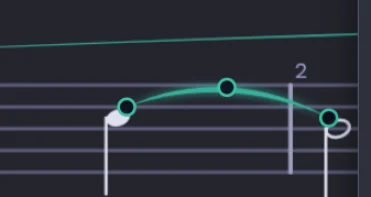
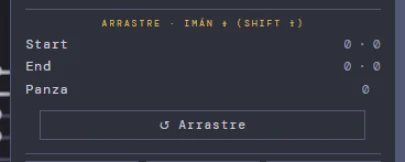
Clic derecho sobre el arco y aparecen tres puntos: inicio, fin y panza. Se arrastran con el mouse y se imantan a un cuarto de espacio —con Shift, a medio—, así que el arco queda donde lo pensaste sin contar píxeles. Lo arrastrado se guarda aparte de los ajustes de botones del editor: un archivo de antes dibuja exactamente igual, y «↺ Arrastre» deshace solo eso. El editor muestra el movimiento en espacios («+¾ · +½»), y Undo también lo conoce.Right-click the arc and three dots appear: start, end and belly. Drag them with the mouse; they snap to a quarter of a space — half with Shift — so the arc lands where you meant it without counting pixels. What you drag is stored apart from the editor's button offsets: an older file draws exactly as before, and "↺ Arrastre" undoes only that. The editor shows the move in spaces ("+¾ · +½"), and Undo knows about it too.
El arco largo se ata a la plicaLong slurs attach to the stem
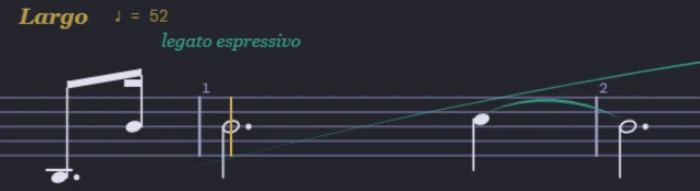
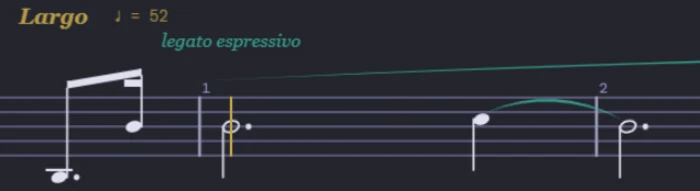
Un ligado de tres compases o más ata cada extremo según de qué lado de esa nota quedó el arco: del lado de la cabeza, a la cabeza; del lado de la plica, a la punta de la plica o al beam. Es la regla de grabado de siempre, la que también siguen Dorico y MuseScore. Antes el arco de nueve compases del Preludio nacía en la cabeza del Si3 de la anacrusa y se metía por debajo del Si4 del compás 1; ahora nace sobre el beam y muere en la plica del La4. Los ligados cortos y los que diste vuelta a mano no se mueven un píxel — la guardia lo mide.A slur of three bars or more attaches each end according to which side of that note the arc ended up on: on the notehead side, to the head; on the stem side, to the stem tip or the beam. It is the engraving rule as it has always been, the one Dorico and MuseScore follow too. Before, the nine-bar arc of the Prelude started at the head of the upbeat B3 and dipped below the B4 of bar 1; now it starts above the beam and ends at the stem of the A4. Short slurs and hand-flipped ones do not move a pixel — the guard measures it.
PULSE: el pulso que se vePULSE: the beat you can see
Un metrónomo en la barra de transporte, entre PITCH y LOOP. No elige el tempo: lo lee de la obra, del tramo donde está el cursor, así que si la partitura cambia de tempo la luz cambia con ella. Y late por SUBDIV: en 1 marca la negra, en 2 la corchea, en 4 la semicorchea, con el primero de cada grupo más fuerte para que se lea el tiempo adentro de la subdivisión. Es de gran ayuda para las hemiolas y los compases compuestos, y fácil de asimilar para quien empieza.A metronome in the transport bar, between PITCH and LOOP. It does not choose the tempo: it reads it from the work, from the section under the cursor, so if the score changes tempo the light changes with it. And it beats by SUBDIV: at 1 it marks the quarter, at 2 the eighth, at 4 the sixteenth, with the first of each group brighter so you can read the beat inside the subdivision. A real help for hemiolas and compound metres, and easy to take in for a beginner.
LOOP A–BA–B loop
Sobre la tira de compases marcas A y B con el botón derecho, y ese tramo se repite sin parar hasta que lo apagues. Cada extremo cuelga una línea vertical de su color —teal la A, azul la B— para verlo de un vistazo, y los triángulos se arrastran. El botón LOOP queda encendido en oro mientras está activo. Es la manera de trabajar un pasaje: dejas el acompañamiento girando y ensayas encima en el Keyboard.On the measure strip you mark A and B with a right click, and that span repeats endlessly until you switch it off. Each end drops a vertical line in its colour — teal for A, blue for B — so you see it at a glance, and the triangles can be dragged. The LOOP button stays lit in gold while it is active. This is how you work a passage: leave the accompaniment going round and rehearse over it on the Keyboard.
La paleta de instrumentos: todos a la vistaThe instrument palette: all of them at a glance
El <select> nativo no acepta columnas —el desplegable lo dibuja el sistema operativo—, así que el clic sobre el campo de instrumento abre una paleta en columnas: todas las familias a la vista de un vistazo, cada una en su columna, con un filtro por nombre arriba. Los instrumentos que el banco tiene pero el mapa activo no, salen apagados en vez de desaparecer: se ve que existen y que hoy no están cargados. El pin la deja abierta para probar varios seguidos y comparar de oído; desfijada, elegir uno la cierra. La elección vuelve por el mismo camino de siempre, así que no cambia nada del mix. Es la misma paleta en las cuatro apps —Score, Keyboard, Console y Register—, servida por mm-presets.js.The native <select> cannot do columns —the OS draws that dropdown— so clicking the instrument field opens a column palette instead: every family visible at a glance, each in its own column, with a name filter on top. Instruments the bank has but the active map does not are shown dimmed rather than hidden: you can see they exist and that they are not loaded today. The pin keeps it open so you can try several in a row and compare by ear; unpinned, picking one closes it. The choice returns through the usual path, so nothing about the mix changes. It is the same palette in all four apps —Score, Keyboard, Console and Register— served by mm-presets.js.
Y recuerda dónde la dejaste: si la corres al costado para no tapar el panel de canales, la próxima vez abre ahí — canal tras canal, y también en la app siguiente. El tamaño y el sitio viajan juntos, así que agrandarla no le hace olvidar el lugar. La primera vez, sin memoria todavía, nace al lado del panel que la abrió y no encima.And it remembers where you left it: move it aside so it does not cover the channel panel and it opens there next time — channel after channel, and in the next app too. Size and place travel together, so resizing it does not make it forget the spot. The first time, with no memory yet, it is born beside the panel that opened it, not on top of it.
Score Navigator: mapa y reglaScore Navigator: map and ruler
La tira de arriba es un mapa de la obra entera: compases, secciones con nombre, el cursor y la cabeza de reproducción. Con el botón derecho puedes acercarte a un tramo —16 compases, o el loop A–B— y ahí cambia de oficio: se vuelve una regla alineada con el grabado, así cada marca cae exactamente sobre su barra de compás, y sigue la partitura cuando la desplazas. «Ver la obra entera» vuelve al mapa y al zoom que tenías.The strip on top is a map of the whole work: measures, named sections, the cursor and the playhead. With a right click you can zoom into a span — 16 bars, or the A–B loop — and there it changes trade: it becomes a ruler aligned to the engraving, so every mark falls exactly on its barline, and it follows the score as you scroll. "Whole work" returns to the map and to the zoom you had.
Secuencias: el estado de un compás, repetidoSequences: the state of one bar, repeated
Un compás se puede repetir a lo largo de un tramo —el caso típico es el pedaleo: escribes cómo se pedalea UN compás y dices «y así hasta el 61»—. Eso es una secuencia, y ahora tiene su ventana: Open sequence…, en el panel SELECT o en el clic derecho. Lista las que hay en la obra con su tramo y el contenido del compás del patrón, y el clic en una fila lleva la vista ahí.One bar can repeat over a span — the typical case is pedalling: you write how ONE bar is pedalled and say «and so on through 61». That is a sequence, and it now has its own window: Open sequence…, from the SELECT panel or the right-click. It lists the ones in the work with their span and the contents of the pattern bar, and clicking a row takes the view there.
Hay dos maneras de hacerla y suenan igual, pero se ven distinto. La REGLA (⟳) no escribe nada: el motor estampa el patrón en cada reproducción y en la hoja no aparece ni una marca nueva. ESCRIBIR (⧉) pone marcas de verdad, una tanda por compás, editables una por una. Y un interruptor ◉ SE VEN / ◌ OCULTAS decide si esas marcas salen en la página: ocultas suenan igual, porque la tinta y los pies son dos capas.There are two ways to make one and they sound the same, but they look different. The RULE (⟳) writes nothing: the engine stamps the pattern on every playback and not a single new mark appears on the page. WRITE (⧉) puts real marks, one set per bar, editable one by one. And a ◉ SHOW / ◌ HIDE switch decides whether those marks appear on the page: hidden ones still sound, because ink and feet are two layers.
Cada fila lleva además un ◉/◌ que prende la línea de su tramo sobre el primer pentagrama, para ver de un vistazo hasta dónde llega. Apagada por defecto, y no se guarda en el archivo: es ayuda de trabajo, no notación.Each row also carries a ◉/◌ that turns on its span line above the top staff, to see its reach at a glance. Off by default, and not saved in the file: a working aid, not notation.
El pedal que queda abiertoPedal left open
Un ✻ con profundidad —medio pedal, un cuarto— no levanta el pie: dice «sigue con menos pedal». Es una técnica real, pero tiene una consecuencia invisible: si toda la secuencia usa ✻ parciales, ningún levantamiento cierra, y el pedal sigue hundido hasta la próxima marca escrita, aunque esté treinta compases más adelante. Ahora el Coach lo avisa cuando una región queda abierta más de cuatro compases, con los dos compases y el número. No corrige nada por su cuenta: sólo te cuenta lo que quedó escrito.A ✻ with a depth — half pedal, quarter pedal — does not lift the foot: it says «carry on with less pedal». It is a real technique, but it has an invisible consequence: if the whole sequence uses partial ✻, no lift ever closes, and the pedal stays down until the next written mark, even thirty bars later. The Coach now warns when a region stays open for more than four bars, with both bars and the count. It corrects nothing on its own: it just tells you what you wrote.
Para cerrar una secuencia de pedaleo, el último ✻ tiene que ser seco. Y si la secuencia es una regla con «hasta el compás», el cierre lo pone el motor en el borde: el patrón vale hasta ese compás y ni uno más.To close a pedalling sequence, the last ✻ has to be a dry one. And if the sequence is a rule with a «through bar», the engine closes it at the border: the pattern is valid through that bar and not one further.
El navegador sigue al zoomThe navigator follows the zoom
La tira de arriba ya sabía ser las dos cosas —mapa de la obra entera y regla sobre un tramo—, pero sólo cambiaba de oficio desde su propio menú. Si acercabas la partitura con la barra, seguía siendo un mapa de cientos de compases sobre un pentagrama que muestra seis, y las marcas caían donde no era. Ahora el zoom la lleva de la mano: los botones ±, el desplegable, Ctrl+rueda y la lupa le avisan, ella mide qué compases hay en pantalla y se vuelve regla sobre ellos, con cada marca sobre su barra de compás. Si en pantalla entra la obra entera, vuelve a ser mapa sola.The strip on top already knew how to be both — a map of the whole work and a ruler over one span — but it only changed trade from its own menu. If you zoomed the score from the toolbar, it stayed a map of hundreds of bars over a staff showing six, and the marks fell in the wrong place. Now the zoom takes it along: the ± buttons, the dropdown, Ctrl+wheel and the magnifier all tell it, it measures which bars are on screen and turns into a ruler over them, every mark on its own barline. If the whole work fits on screen, it goes back to being a map by itself.
Editar desde el panel de canalesEditing from the channel panel
El panel de canales era para mirar: los editores de clic derecho vivían todos en la partitura grande, y para corregir algo que estabas viendo ahí había que volver al canvas principal. Ahora el clic derecho también funciona en el panel, con los mismos editores de siempre — nota, ligadura, dinámica, gesto, tresillo, tempo—, cada fila resolviendo su canal verdadero y el popup abriéndose bajo el puntero, donde lo estás mirando.The channel panel was for looking: the right-click editors all lived on the main score, and to fix something you were seeing there you had to go back to the main canvas. Now right-click works in the panel too, with the very same editors — note, slur, dynamic, gesture, tuplet, tempo — each row resolving its true channel and the popup opening under the pointer, right where you are looking.
Si♯ no es DoB♯ is not C
En un teclado igual temperado Si♯ y Do son la misma tecla. En afinación pitagórica no: hay una coma entre los dos, y esa coma es la que hace que una sensible tire hacia arriba. Por eso en el Score no hay un botón que cambie una grafía por otra — hubo uno durante unos días de septiembre y se retiró: trataba como iguales dos sonidos distintos y además ensuciaba la nota. La nota se escribe con su letra: para un Si♯, la nota Si y el ♯ de los botones Acc. Cada grafía tiene su propia razón en la tabla pitagórica, así que ese Si♯ suena como Si♯: una coma arriba del Do, que es donde lo pone el oído. Y cuando la obra viene de un MIDI, el Player deduce las grafías de la armadura al convertirla.On an equal-tempered keyboard B♯ and C are the same key. In Pythagorean tuning they are not: there is a comma between them, and that comma is what makes a leading tone pull upward. That is why the Score has no button that swaps one spelling for another — there was one for a few days in September and it was withdrawn: it treated two different sounds as one, and it also corrupted the note. A note is written with its own letter: for a B♯, the note B and the ♯ from the Acc buttons. Each spelling has its own ratio in the Pythagorean table, so that B♯ sounds like a B♯: a comma above the C, which is where the ear puts it. And when the piece comes from a MIDI file, the Player deduces the spellings from the key signature when converting it.
La marca, donde se ve la notaThe mark, where the note is seen
Un contrabajo suena una octava más grave de lo que se escribe, y un corno en Fa una quinta más grave. En vista escrita la partitura muestra lo que el músico lee — pero los trémolos del contrabajo caían una octava lejos de su nota, y el clic para seleccionarla erraba por la misma distancia. En violas y cellos no pasaba nada, porque no transponen. Ahora toda marca se posiciona contra la altura que se ve, no contra la que suena, y el clic cae donde está la nota. Vale para cualquier canal que transponga: clarinetes, cornos, trompetas, contrabajos.A double bass sounds an octave lower than written, a horn in F a fifth lower. In written view the score shows what the player reads — but the double bass tremolos landed an octave away from their note, and clicking to select it missed by the same distance. Violas and cellos were fine, because they do not transpose. Now every mark is placed against the pitch you see, not the one you hear, and the click lands on the note. This holds for any transposing channel: clarinets, horns, trumpets, double basses.
Abrir un .mxl sin descomprimirloOpening a .mxl without unzipping it
El .mxl es el MusicXML comprimido: es lo que exportan Finale, MuseScore y Sibelius. Ahora el Score lo abre directo, con el mismo botón con el que abrías un .xml, sin descomprimirlo a mano. Mira el contenido del archivo y no su nombre, así que un .musicxml o un .xml que en realidad vengan comprimidos entran igual. Un dato del músico, no del Score: Finale v27.4 abre el .mxl sólo por File → Import → MusicXML; su File → Open lo rechaza con «Invalid file type», incluso los .mxl que exporta él mismo.A .mxl is compressed MusicXML: it is what Finale, MuseScore and Sibelius export. The Score now opens it directly, with the same button you used for a .xml, with no unzipping by hand. It looks at the file’s content, not its name, so a .musicxml or .xml that is in fact compressed gets in all the same. A musician’s fact, not the Score’s: Finale v27.4 opens a .mxl only through File → Import → MusicXML; its File → Open rejects it with "Invalid file type", even .mxl files Finale itself exported.
Los corchetes y las llaves viajan con la partituraBrackets and braces travel with the score
Al importar, los grupos de familia del archivo llegan dibujados —corchete, sub-corchete y llave—, con la barra de compás unida o cortada según lo que diga el archivo; un grupo anidado dentro de otro queda como sub-corchete, sin importar en qué orden lo haya escrito el programa que exportó. Y al exportar salen escritos igual: la ida y la vuelta están probadas. Lo que todavía no entra: el título, el subtítulo y el copyright de la página, las palabras de expresión que no van con un tempo (pizz., arco, grazioso, unis., colla parte…), la abreviatura del instrumento y el nombre del grupo.On import, the file’s family groups arrive drawn —bracket, sub-bracket and brace—, with the barline joined or cut as the file says; a group nested inside another ends up as a sub-bracket, whatever order the exporting program wrote it in. And on export they are written back out: the round trip is tested. What still does not come in: the page’s title, subtitle and copyright, expression words that do not go with a tempo (pizz., arco, grazioso, unis., colla parte…), the instrument’s short name and the group name.
Copiar un canal se lleva sus marcasCopying a channel takes its marks along
El clic derecho sobre un canal ofrece Copiar canal y Pegar canal. Hasta ahora se llevaba sólo las notas: las articulaciones, las dinámicas, las expresiones, la agógica, los textos y los cambios de clave se quedaban en el canal de origen, sobre música que ya no estaba. Ahora el canal viaja entero, con todo lo que hay escrito en él, y el canal de destino se reemplaza completo — notas y marcas — para que no queden dos capas mezcladas. Lo único que no viaja es lo que pertenece a varios pentagramas a la vez (una marca compartida por JOIN): copiarla la multiplicaría.Right-clicking a channel offers Copy channel and Paste channel. Until now only the notes travelled: articulations, dynamics, expressions, agogics, texts and clef changes stayed behind in the source channel, sitting on music that was no longer there. Now the whole channel travels, with everything written on it, and the target channel is replaced entirely — notes and marks — so two layers never end up mixed. The only thing that does not travel is what belongs to several staves at once (a mark shared through JOIN): copying it would multiply it.
Repetir un compás, y también su gestoRepeating a bar, and its shaping too
Una secuencia repite el estado de un compás a lo largo de un tramo. Hasta ahora repetía las marcas; ahora puede repetir también la forma de la velocity — el acento que pusiste a mano, el final de un poco dim. Es un interruptor propio en la ventana de secuencias, ◌ VEL, apagado por defecto: repetir una marca y repetir una interpretación no son lo mismo, y hay que pedirlo. Se acota solo — entra sólo en los canales donde escribiste alguna velocity a mano en ese compás, y nunca pisa un compás que ya tenga la suya. La nota que no tocaste sigue a la dinámica, como siempre.A sequence repeats the state of one bar across a span. Until now it repeated the marks; now it can also repeat the velocity shaping — the accent you set by hand, the tail of a poco dim. It is a switch of its own in the sequences window, ◌ VEL, off by default: repeating a mark and repeating an interpretation are not the same thing, and it has to be asked for. It bounds itself — it only enters channels where you actually set a velocity by hand in that bar, and it never overwrites a bar that already has its own. A note you did not touch keeps following the dynamic, as always.
La velocity que escribes a mano mandaA velocity you set by hand wins
Dentro de un grupo barrado, el motor reparte peso solo — la primera pesa más que las de adentro — pero sólo donde nadie dijo nada. Faltaba un caso: la velocity que el intérprete fija en una nota concreta. Un acento escrito en 55 llegaba al motor como 41, y un 40 al final de un poco dim como 4. Ahora esa nota queda intocada — también en el vibrato, que sigue la misma escalera — y el reparto automático se aplica alrededor de ella.Inside a beamed group the engine distributes weight on its own — the first note weighs more than the inner ones — but only where nobody said otherwise. One case was missing: the velocity the performer sets on one specific note. An accent written at 55 reached the engine as 41, and a 40 at the tail of a poco dim as 4. That note is now left alone — vibrato included, since it follows the same ladder — and the automatic distribution applies around it.
Las cuerdas, en la escala de la orquestaThe strings, on the orchestra's scale
Tres molestias que parecían distintas — las violas no se oían, el violín I escrito en piano tapaba a todos, y el volumen general saturaba a los pocos compases — resultó que eran una sola: medida instrumento por instrumento a la misma velocity, la orquesta entera vivía dentro de una franja de 10 dB y la sección de violines estaba 40 dB por encima. Corregida por registro y no de un tirón, porque además subía a medida que subía la nota. La viola, de paso, abrió su agudo: la nota que canta ya no entra por debajo del pedal de abajo. El timbre no se tocó. Segunda mitad de esa historia (16-09): medida por el camino que de verdad usa el Score —y no por el que usaba la prueba—, la sección de violines todavía caía 21,5 dB del grave al agudo, así que la melodía del Violín I, que vive arriba, entraba por debajo de todo. Corregida otra vez por registro, el desnivel queda en 0,6 dB; y después, de oído, la curva entera subió 18 dB sin cambiar de forma: en la obra el Violín I pasa de quedar tapado a estar 4 dB encima del pizz de los segundos y 11 encima de las violas. Chelos y contrabajos siguen para el próximo paso — medidos por el camino real, el contrabajo está bastante más arriba de lo que dice su propia ficha.Three complaints that looked unrelated — violas could not be heard, the first violins written piano covered everyone, and the overall level clipped after a few bars — turned out to be one: measured instrument by instrument at the same velocity, the whole orchestra lived inside a 10 dB band and the violin section sat 40 dB above it. Corrected by register rather than in one stroke, because it also rose as the note rose. The viola, along the way, opened its top: the singing note no longer comes in under the pedal below it. Timbre untouched. Second half of that story (16-09): measured on the path the Score really uses —and not on the one the test used— the violin section was still dropping 21.5 dB from bottom to top, so the first violins’ melody, which lives up there, came in under everything. Corrected by register once more, the unevenness is down to 0.6 dB; and then, by ear, the whole curve was raised 18 dB without changing shape: in the work the first violins go from being covered to sitting 4 dB above the second violins’ pizz and 11 above the violas. Cellos and basses are still the next step — measured on the real path, the double bass sits well above what its own sheet claims.
El matiz escrito es el techo del grupo barradoThe written dynamic is the beamed group’s ceiling
Los Intelligent Beams bajaban peldaños de la escalera de matices, y esa escalera no es proporcional: el mismo nivel valía ×0,33 saliendo de un ppp y ×0,85 saliendo de un f — seis gestos con el mismo nombre. Ahora el matiz que escribiste es el techo: la primera nota lo conserva entero y cada siguiente vale una razón fija de la anterior — nivel 1 ×0,75 · 2 ×0,60 · 3 ×0,45 · 4 ×0,30 · 0 nada. El mismo nivel es el mismo gesto salga de un p o de un ff. Hay un nivel 4 nuevo, y el nivel existe también en un grupo de dos — el par de corcheas por tiempo, el caso más común de toda la notación, antes sonaba igual en 1, 2 y 3.Intelligent Beams used to walk down rungs of the dynamics ladder, and that ladder is not proportional: the same level was worth ×0.33 out of a ppp and ×0.85 out of an f — six gestures under one name. Now the dynamic you wrote is the ceiling: the first note keeps it whole and each next one is a fixed ratio of the previous — level 1 ×0.75 · 2 ×0.60 · 3 ×0.45 · 4 ×0.30 · 0 none. The same level is the same gesture out of a p or an ff. There is a new level 4, and the level now exists in a group of two as well — the pair of eighths per beat, the commonest case in all of notation, used to sound identical at 1, 2 and 3.
Cada voz conserva su matiz, y el grupo es la corrida que dibuja la hojaEach voice keeps its dynamic, and the group is the run the page draws
En un pentagrama compartido la frontera del grupo sigue siendo del pentagrama —la abre la voz que entra primero— pero el techo es de cada voz: la primera nota que cada una pone en el grupo conserva su matiz escrito. Antes el bajo que marca el tiempo le robaba el techo al acompañamiento que entra después, y había que escribir un ff para oír un mp; ahora un pedal se escribe como lo que es, con su propio matiz. Y cuando la agrupación la manda la barra, el grupo es exactamente la corrida que dibuja la hoja, de 2 a N notas: en 6/8 la hoja dibujaba 3+3 y el motor tocaba 2+2+2. Un silencio ocupa su lugar dentro del grupo y no lo parte — en el grupo por barra sí corta, porque un beam no cruza un silencio.On a shared staff the group’s boundary still belongs to the staff —the voice entering first opens it— but the ceiling belongs to each voice: the first note each one puts into the group keeps its written dynamic. Before, the bass marking the beat stole the ceiling from the accompaniment entering after it, and you had to write an ff to hear an mp; now a pedal is written as what it is, with its own dynamic. And when the beam rules the grouping, the group is exactly the run the page draws, from 2 to N notes: in 6/8 the page drew 3+3 while the engine played 2+2+2. A rest holds its place inside the group and does not split it — in a beam group it does cut, because a beam does not cross a rest.
El popup Int·Beams: General, el tramo M → M y un pie que dice el estadoThe Int·Beams popup: General, the M → M range and a footer that says the state
Clic derecho sobre 3·2 abre el popup de Intelligent Beams. La perilla de la obra se llama General (antes Global) y va de 0 a 4. Se fue el ◉ de la fila del tramo —movía el tramo por atrás y le cambiaba el sentido a las casillas—, así que el tramo es siempre lo que dicen M → M. La fila GROUP se lee como se lee un beam: barra · figura (1/8, 1/16, 1/32, 1/64) · Notas, con − y +, de 1 a 16, en vez de una cantidad de negras — 3 corcheas es el viejo 3+3. SPLIT se eliminó. Y el popup tiene un pie que dice el estado: qué tramo y qué canales agarró, cuántas notas, qué agrupación rige y qué nivel, con cuántas notas en cada valor; cuando algo está mezclado, se ve mezclado. El nivel General se deshace con Ctrl+Z como cualquier edición, y el popup abierto muestra el nivel que volvió.Right-click on 3·2 opens the Intelligent Beams popup. The piece-wide knob is called General (formerly Global) and runs from 0 to 4. The ◉ of the range row is gone —it moved the range behind your back and changed what the boxes meant— so the range is always what M → M say. The GROUP row reads the way a beam reads: beam · figure (1/8, 1/16, 1/32, 1/64) · Notes, with − and +, from 1 to 16, instead of a number of quarters — 3 eighths is the old 3+3. SPLIT is gone. And the popup has a footer that says the state: which range and channels it took, how many notes, which grouping rules and which level, with how many notes at each value; when something is mixed, it looks mixed. The General level is undone with Ctrl+Z like any edit, and an open popup shows the level that came back.
Los ocho matices, de nuevo: la escalera empieza en 16The eight dynamics, re-set: the ladder starts at 16
Los ocho matices pasan a ppp 16 · pp 20 · p 26 · mp 33 · mf 42 · f 53 · ff 68 · fff 86 (sobre 127). Antes la escalera empezaba en 6, y debajo de 16 el motor no resuelve un cambio de nivel: medido, lo que compra un nivel 3 es +0,2 dB saliendo de 9 y +7,0 dB saliendo de 16 — un ppp no llegaba a articular. Sigue siendo el más suave de los ocho y ahora además se oye. Conviene decirlo derecho: la escalera es fuente única, así que una obra guardada cuyas marcas no tengan velocity propia suena distinta con esta versión, más presente en los matices suaves. No hay nada que rehacer: es el mismo archivo, mejor oído.The eight dynamics become ppp 16 · pp 20 · p 26 · mp 33 · mf 42 · f 53 · ff 68 · fff 86 (out of 127). The ladder used to start at 6, and below 16 the engine cannot resolve a change of level: measured, what a level 3 buys is +0.2 dB out of 9 and +7.0 dB out of 16 — a ppp never managed to articulate. It is still the softest of the eight, and now it is audible too. Worth saying plainly: the ladder is a single source, so a saved work whose marks carry no velocity of their own sounds different in this version, more present in the soft dynamics. There is nothing to redo: it is the same file, better heard.
Snap to grid: empuja a la reja lo que está fueraSnap to grid: it pushes in what is out of the grid
Snap to grid (panel SELECT) no era un snap: re-fluía por duración — cada nota caía en la suma de las duraciones de las anteriores, sin mirar ninguna reja —, así que desarmaba los acordes y un compás cuyas duraciones no sumaran el compás empujaba todo lo que venía detrás. Ahora snapea de verdad: cada ataque va al múltiplo más cercano de la reja y las notas que comparten ataque viajan juntas, así que un acorde sigue siendo un acorde. La reja es la del editor (el SUBDIV de la barra); los tresillos van a su propia reja ternaria. Las duraciones no se tocan, lo que ya estaba en su lugar no se mueve, las marcas viajan con su nota y un solo Ctrl+Z devuelve todo. Sirve en archivos de cientos de notas.Snap to grid (SELECT panel) was not a snap: it re-flowed by duration — each note landed on the sum of the previous durations, without looking at any grid — so it took chords apart, and a bar whose durations did not add up to the bar pushed everything behind it. Now it really snaps: each attack goes to the nearest multiple of the grid and notes that share an attack travel together, so a chord stays a chord. The grid is the editor’s (the toolbar SUBDIV); tuplets go to their own ternary grid. Durations are untouched, whatever was already in place does not move, marks travel with their note and a single Ctrl+Z brings everything back. It works on files of hundreds of notes.
Sound FX por canal y área: reverb, eco, porta y vibratoSound FX by channel and area: reverb, echo, porta and vibrato
En el rótulo de cada canal, Sound FX… abre un popup con seis perillas —Reverb · Eco wet · Eco realim · Eco temp · Porta · Vibrato— que se escriben como una región: el efecto se oye en el playback, no en vivo. El alcance se elige con los radios de la casa —This channel · This place · Selection—, preferenciando áreas cortas, idealmente una nota: es ahí donde el eco y la reverb le dan carácter armónico a una línea melódica, y el porta el legato de deslizarse a la nota. El FX entra al Ctrl+Z, y Limpiar borra el área activa —o el canal entero si el área no tiene FX pero el canal sí—. El popup del Score afecta solo el playback (Motor B) y el del Keyboard solo el vivo (Motor A): no se mezclan.On each channel's label, Sound FX… opens a popup with six knobs —Reverb · Echo wet · Echo fb · Echo time · Porta · Vibrato— written as a region: the effect is heard in playback, not live. The scope is chosen with the house radios —This channel · This place · Selection—, favoring short areas, ideally a single note: that is where echo and reverb give a melodic line its harmonic character, and porta the legato of sliding into the note. FX joins Ctrl+Z, and Clean clears the active area —or the whole channel if the area has no FX but the channel does—. The Score's popup affects only playback (Engine B) and the Keyboard's only live play (Engine A): they do not mix.
Cada popup te lleva a su página del manualEvery popup takes you to its page in the manual
Todos los popups del Score —los de la barra, los editores del canvas y los menús del botón derecho— llevan ahora un ? en teal pegado al título. Un clic y se abre, en otra pestaña, la sección de la Guía de uso que cuenta ese popup: 68 marcas, una por popup, cada una con su sección escrita. Siempre en el mismo sitio, así que no hay que adivinar en cuál hay ayuda y en cuál no.
Y donde hacía falta más que un enlace, el ? te lo cuenta en el momento sin sacarte de lo que estabas haciendo: el gesto de la nota, el gesto del ligado, el Toque y el Estado de una palabra de expresión, y la agógica de frase. Ahí el Coach responde en dos renglones y deja un más ⟶ para la versión larga.Every popup in the Score —the toolbar ones, the canvas editors and the right-click menus— now carries a teal ? beside its title. One click opens, in a new tab, the section of the User Guide that covers that popup: 68 marks, one per popup, each with its section written. Always in the same place, so there is no guessing which popup has help and which does not.
And where a link was not enough, the ? tells you right there without taking you out of what you were doing: the note gesture, the slur gesture, the Touch and the State of an expression word, and phrase agogics. There the Coach answers in two lines and leaves a more ⟶ for the long version.
Escribe la expresión en tu idiomaWrite the expression in your own language
El campo de texto del popup EXPR nunca filtró nada: escribes la palabra en el idioma que quieras, que es la regla del papel. Lo que cambia es que ahora ves qué hace antes de insertarla — el ? de la línea azul te dice a qué término se resuelve, de qué grupo es y si suena — y que si no la conoce, puedes atarla: se comporta como… y eliges el término al que se parece. La tinta queda como la escribiste. El vínculo viaja dentro del .mmf, así que tu obra suena igual en la máquina de otro, y una casilla lo guarda también para el resto de tus obras. Contado largo en la Guía de uso.The text field in the EXPR popup never filtered anything: you write the word in whatever language you like, which is the rule of paper. What changes is that now you see what it does before inserting it — the ? on the blue line tells you which term it resolves to, which group it belongs to and whether it sounds — and that if it does not know the word, you can link it: behaves like… and you pick the term it resembles. The ink stays as you wrote it. The link travels inside the .mmf, so your piece sounds the same on someone else’s machine, and a checkbox keeps it for the rest of your pieces too. Told at length in the User Guide.
La lista de instrumentos habla tu idiomaThe instrument list speaks your language
La lista de instrumentos salía mezclada —unos nombres en inglés, otros en castellano, y los títulos de familia siempre en inglés—. Ahora la lista entera habla el idioma que elegiste, títulos de familia incluidos, tanto en el campo Instrument de la tarjeta de canal como en la ventanita de cada fila del popup CHANNELS y en la paleta en columnas. Lo que ves cambia; lo que el archivo guarda, no: el nombre interno de cada instrumento no se traduce, así que un .mmf suena igual en cualquier máquina. En la misma pasada quedaron en tu idioma varios textos y globitos que se habían quedado en castellano: «La cuenta del juego», el botón Unfold ⇥, los globitos de compás final y tamaño en px, el de los chips Ex. y el del alfiler de BARLINES. Contado largo en la Guía de uso.The instrument list used to come out mixed —some names in English, others in Spanish, and the family titles always in English—. Now the whole list speaks the language you chose, family titles included, both in the channel card's Instrument field and in the small selector on each row of the CHANNELS popup, and in the column palette. What you see changes; what the file stores does not: each instrument's internal name is never translated, so an .mmf sounds the same on any machine. In the same pass several texts and tooltips that had stayed in Spanish now follow your language: «The game count», the Unfold ⇥ button, the last-bar and px-size tooltips, the one on the Ex. chips and the one on the BARLINES pin. Told at length in the User Guide.
Doble clic en el pentagrama: el compás queda seleccionadoDouble-click the staff: the bar is selected
Doble clic sobre el pentagrama, donde no hay una cabeza, y queda seleccionado ese compás entero, en ese canal. No hace falta encender nada antes: el doble clic entra al modo SELECT solo y deja la selección cerrada, lista para el popup de acciones o para el Note spacing. Desde ahí, Shift + clic en otro compás del mismo canal estira la selección hasta ahí, y se pueden encadenar. Como no hay arrastre, no hay manera de empujar una nota sin querer — que es exactamente lo que pasaba cuando había que arrastrar por encima de las cabezas para marcar un compás. Y es lo que el Note spacing estaba esperando: su desplegable, en Score Options, aplica a la región mientras haya una selección cerrada —el rótulo de al lado dice sobre qué trabaja, «region 3–6»— y a la obra entera cuando no hay ninguna; al entrarle con el mouse se re-sincroniza y muestra el factor de esa región. Los otros dos gestos del mismo pentagrama no cambian: el doble clic sobre una cabeza sigue siendo el del acorde, y el clic dentro de una selección ya cerrada la agarra para moverla. Contado largo en la Guía de uso.Double-click on the staff, where there is no notehead, and that whole bar is selected, in that channel. Nothing needs switching on first: the double-click enters SELECT mode by itself and leaves the selection closed, ready for the actions popup or for Note spacing. From there, Shift + click on another bar of the same channel stretches the selection up to it, and they can be chained. Since there is no dragging, there is no way to nudge a note by accident — which is exactly what happened when you had to drag across the noteheads to mark a bar. And it is what Note spacing was waiting for: its dropdown, in Score Options, applies to the region as long as there is a closed selection —the label beside it says what it is working on, «region 3–6»— and to the whole piece when there is none; entering it with the mouse re-syncs it and it shows that region’s factor. The other two gestures on the same staff are unchanged: a double-click on a notehead is still the chord one, and a click inside an already closed selection grabs it to move it. Told at length in the User Guide.
Las notitas entran en el compás, y no al revésGrace notes fit into the bar, not the other way round
Una apoyatura se reservaba 34 px de ancho — más de lo que ocupa una columna de semicorchea entera —, y como esa tinta no se estira ni se encoge con el Note spacing, caía entera en su columna y torcía el compás. Medido en un pasaje con la misma figura en todos los compases: los que tenían notita salían 161 y 238 px y el único que no la tenía, 127. El ritmo era regular; lo que desordenaba era la reserva. Ahora una notita se reserva 18 px, que es una cabeza y su aire, y sigue creciendo si hay varias. Y cuando la notita choca con la nota del beat 1 —la reserva que hace que el compás arranque más adentro— ese espacio ya no es un número fijo: lleva tope del 12 % del ancho del compás, así que en un compás ancho no se nota y en uno flaco deja de deformarlo. Es la decisión de grabado de que la notita entre en el compás en vez de que el compás crezca para ella.A grace note used to reserve 34 px of width — more than a whole sixteenth column takes — and since that ink neither stretches nor shrinks with Note spacing, it fell whole into its column and twisted the bar. Measured on a passage with the same note values in every bar: the ones with a grace note came out 161 and 238 px and the only one without it, 127. The rhythm was regular; what was disordering it was the reservation. Now one grace note reserves 18 px, which is a notehead and its air, and it still grows if there are several. And when the grace note collides with the note on beat 1 —the reservation that makes the bar start further in— that space is no longer a fixed number: it carries a cap of 12 % of the bar's width, so in a wide bar you do not notice and in a thin one it stops deforming it. It is the engraving decision that the grace note fits into the bar instead of the bar growing for it.
El punto, en una cuerda con arco, es una arcadaThe dot, on a bowed string, is a bow stroke
El punto sobre una nota de cuerda con arco ya no es «la mitad del valor»: es una arcada corta, y una arcada dura más o menos lo mismo toque la figura que toque. Dos notas con punto de figuras distintas salen del mismo largo, con un tope relativo para que el punto siga haciendo algo en las muy cortas. Antes, en un grupo rápido el punto se comía la nota —una semicorchea con punto salía en 84 ms y no llegaba a sonar— mientras una corchea con punto del mismo pasaje sonaba bien; ahora las dos duran 145 ms. El color viene con el largo: más oscuro, entra rápido, con el ruido del arco al doble. Sólo en la cuerda frotada: en el pizzicato no cambia nada, porque un pellizco no es una arcada. Y lo que escribes manda: si pusiste otra arcada —sautillé, punta d'arco— o una marca de técnica, gana lo escrito. La perilla ART de la Console sigue rigiendo sobre todo esto. De paso, la palabra spiccato por fin hace algo: escrita en el tramo de expresión —con spicc., picchettato y picado— el motor la lee y toca ese tramo con la arcada corta. Hasta hoy era tinta.The dot on a bowed string note is no longer “half the value”: it is a short bow stroke, and a bow stroke lasts roughly the same however long the note value is. Two dotted notes of different values come out the same length, with a relative cap so the dot still does something on very short ones. Before, in a fast group the dot ate the note —a dotted sixteenth came out at 84 ms and never quite sounded— while a dotted eighth in the same passage sounded right; now both last 145 ms. The colour comes with the length: darker, quick entry, bow noise doubled. Bowed strings only: on pizzicato nothing changes, because a pluck is not a bow stroke. And what you write rules: if you wrote another bow stroke —sautillé, punta d'arco— or a technique mark, what is written wins. The Console's ART knob still rules over all of this. Along the way, the word spiccato finally does something: written in the expression span —together with spicc., picchettato and picado— the engine reads it and plays that span with the short stroke. Until today it was ink.
El acento es una llegada, no un golpeAn accent is an arrival, not a blow
Un acento escrito sin número propio pesaba demasiado: en un grupo rápido compraba 13,6 dB sobre sus vecinas y se oía como un golpe, en vez de como el reposo al que va el grupo. Y el que sobresalía no era el peso sino el brillo: medido, la marca sola compraba 3,7 dB, y de ésos 2,4 eran el filo del ataque. Ahora un acento sin número compra unos 2 dB sobre su grupo — un escalón, no un salto — y la marca sola 1,3. Sigue habiendo acento, entra más rápido y más claro, pero deja de tapar a las notas con punto que lo rodean. Lo que no cambia, y conviene saberlo: un acento que ya tiene su número escrito adentro (el Weight de su popup) no mira el valor nuevo y suena como lo dejaste; si una obra vieja tiene acentos demasiado fuertes, se corrigen marca por marca en su popup. El marcato y el stress quedan como estaban.An accent written without a number of its own weighed too much: in a fast group it bought 13.6 dB over its neighbours and was heard as a blow instead of as the point of rest the group leads to. And what stood out was not the weight but the brightness: measured, the mark alone bought 3.7 dB, and 2.4 of those were the edge of the attack. Now an accent with no number buys about 2 dB over its group — a step, not a leap — and the mark alone 1.3. There is still an accent, it comes in faster and brighter, but it stops covering the dotted notes around it. What does not change, and is worth knowing: an accent that already carries its own number (the Weight in its popup) does not look at the new value and sounds as you left it; if an old piece has accents that are too strong, they are fixed mark by mark in their popup. Marcato and stress stay as they were.
Una arcada escrita rige hasta la próxima marcaA written bow mark rules until the next one
Escribir ⊓ o V ya no corrige una sola nota: abre una arcada que dura hasta la próxima marca de ese canal, y todas las notas de ese tramo se tocan con la misma dirección. Un silencio escrito la corta, porque por un silencio no se pasa con el arco puesto. Sin ninguna marca escrita no cambia nada: el motor sigue alternando por nota, con el ligado y la cadena de ligaduras de valor contando como una sola arcada. Para qué sirve: la frase que se repite se toca igual. Si escribes ⊓ al empezar la frase y ⊓ al empezar su repetición, las dos suenan con la misma arcada, en vez de caer donde la cuenta las deje. Antes el motor contaba una arcada por nota, así que en un grupo que haces de un solo arcazo gastaba tres y a los pocos compases la dirección estaba invertida. La arcada la decide el intérprete, no la figura: deducirla sola se probó y se descartó — en un mismo pasaje conviven grupos con apoyatura y sin acento, y cualquier regla automática acierta en unos y falla en otros.Writing a ⊓ or a V no longer corrects a single note: it opens a bow stroke that lasts until the next mark on that channel, and every note of that span is played in the same direction. A written rest cuts it, because you do not cross a rest with the bow down. With no mark written at all nothing changes: the engine still alternates note by note, with the slur and the chain of ties counting as one stroke. What it is for: the phrase that repeats is played the same. If you write ⊓ at the start of the phrase and ⊓ at the start of its repetition, both sound with the same bowing instead of landing wherever the count leaves them. Before, the engine counted one stroke per note, so in a group you play in a single stroke it spent three and a few bars later the direction was reversed. The bowing is decided by the player, not by the note values: deducing it automatically was tried and discarded — in one and the same passage there are groups with a grace note and no accent, and any automatic rule gets some right and some wrong.
🔊 SAVE AS WAV — la obra, o los compases elegidos, en un archivo de audio🔊 SAVE AS WAV — the piece, or the chosen bars, as an audio file
En el menú File, debajo de PRINT / PDF. El Score no tiene sonido —el motor es el Cosmic Keyboard—, así que el Score dirige: le pide al Keyboard que capture, toca la obra entera o los compases de la región SELECT, y al terminar espera la cola de la reverb y te descarga un WAV de 24 bits estéreo con el nombre de la obra (Titulo.wav · Titulo - M2-M3.wav). Es una captura en vivo, no una conversión: exportar dura lo que dura la música. Mientras tanto, un cartel te muestra el logo llenándose de teal al ritmo de la obra —respira al pulso—, cuánto falta, en qué compás va y, al final, el nombre, la duración y el tamaño del archivo; CANCEL o Esc descartan sin descargar. Como se graba lo que suena, todo lo que muevas en la Console mientras exporta —faders, pan, mute, master, reverb— queda en el archivo: es una mezcla en vivo. Y lo que toques en el Keyboard también entra. Si el Keyboard no está abierto, el cartel te lo dice y no graba el vacío.In the File menu, below PRINT / PDF. The Score has no sound —the engine is the Cosmic Keyboard—, so the Score conducts: it asks the Keyboard to capture, plays the whole piece or the bars of the SELECT region, and when it ends it waits for the reverb tail and downloads a 24-bit stereo WAV named after the piece (Title.wav · Title - M2-M3.wav). It is a live capture, not a conversion: exporting takes as long as the music. Meanwhile a card shows the logo filling with teal as the piece advances —it breathes with the pulse—, how much is left, which bar is playing and, at the end, the file's name, duration and size; CANCEL or Esc discard without downloading. Since what sounds is what gets recorded, anything you move in the Console while it exports —faders, pan, mute, master, reverb— ends up in the file: it is a live mix. Whatever you play on the Keyboard goes in too. If the Keyboard is not open, the card tells you and nothing empty gets recorded.
Cada perilla de volumen manda sobre lo suyoEach volume knob rules its own
Hasta ahora el Vol del Score, el VOL del Keyboard y el MASTER de la Console eran tres manijas de la misma perilla: bajabas uno y bajaba todo. Ahora cada una manda sobre lo suyo: el Vol del Score sobre lo que el Score manda tocar, el VOL del Keyboard sobre lo que tocas tú en el teclado, y el MASTER de la Console sobre el total — que es lo que graban el ⬤ wav y el SAVE AS WAV. Para qué: con el Score en play, ensayas una melodía encima bajando el Score y dejando tu teclado pleno; o pruebas lo que tienes en la cabeza antes de escribirlo, con la partitura a media luz. Las perillas en su 40 % de siempre suenan exactamente como antes: cambia el reparto, no el nivel.Until now the Score's Vol, the Keyboard's VOL and the Console's MASTER were three handles on the same knob: lower one and everything went down. Now each rules its own: the Score Vol what the Score sends to be played, the Keyboard VOL what you play on the keys, and the Console MASTER the whole — which is what the ⬤ wav and SAVE AS WAV record. What for: with the Score playing, rehearse a melody over it with the Score turned down and your keyboard full; or try what you have in mind before writing it, with the score at half light. The knobs at their usual 40 % sound exactly as before: the split changes, not the level.